EmperiumEngineer GUIDE
Installation of Networking
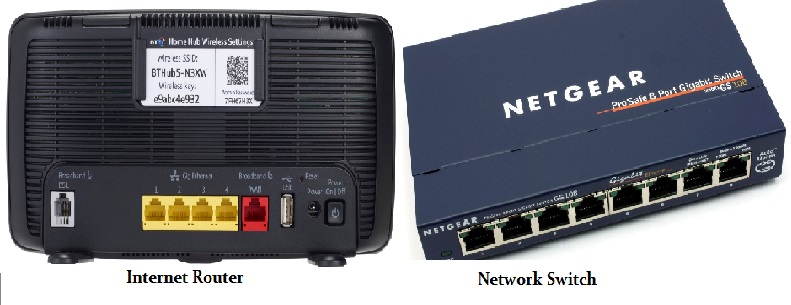
1. Make sure tills are connected on the network, this could be 2 or more tills
connected on the customers Internet router normaly 4 network ports available
or a network switch which will have more network ports.
2. Make sure each till has a unique computer name, and that network sharing enabled
3. If a server is involved in the installation please make sure it has a static IP address
4. Open command promt in each till and do a ipconfig then do a ping to other tills
on the network to
make sure connection is achived
5. If no Internet router is available and networking must be done with only a network switch
then you must give each till an ip addresss and a subnetmask and restart the till/s.
6. If a network printer needs to be installed make sure this is set a static ip address, please see hardware section.
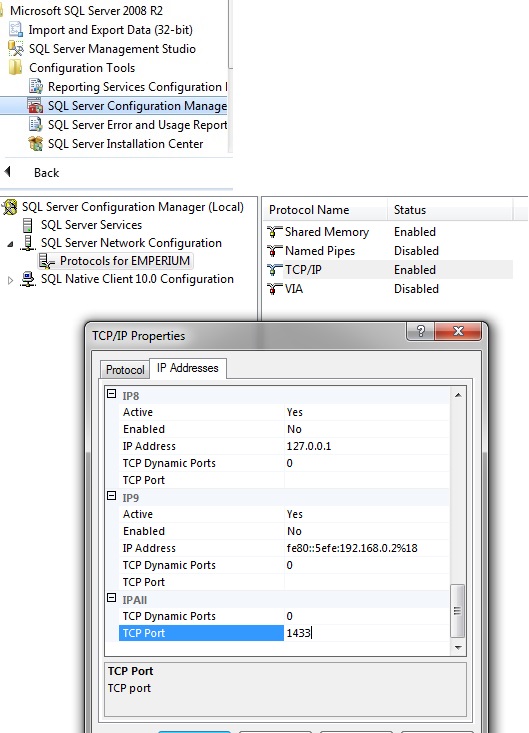
7. You may need to use the sql port which is normally set to 1433 to connect with the software. for example (127.0.0.1\emperium,1433`Emperium_HospitalityV2```)
Make sure the port is set on SQL SERVER CONFIGURATION MANAGER to 1433 see image below
Any problems then please call a senior engineer.
Copyright E-novations ltd. All rights reserved